Analytics
Overview
The SpellSync SDK provides analytics capabilities. You have methods available to notify you when a user has viewed a page. As well as alerts when certain events occur. For example, if the user has received any achievement.
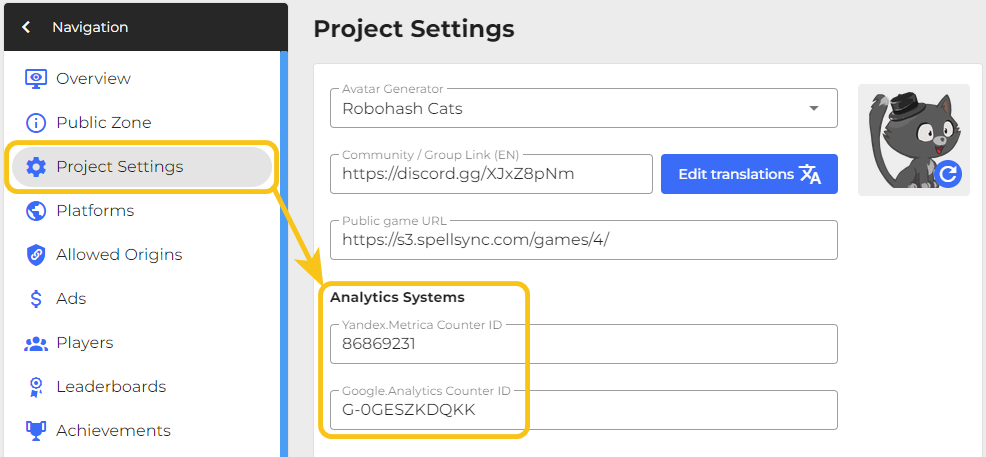
SpellSync uses Yandex Metrica and Google Analytics counters to operate its analytics functions. You can add counters in the Control Panel - Project Settings - Analytics Systems.
Supported Platforms
Please carefully review the requirements of the platforms for processing personal data. Not all platforms allow the installation of trackers. Consult directly with the platform before using a tracker on it. The explicitly allowed list of platforms where analytics systems can be added is provided here.
 Google Play
 PlayDeck
 Yandex Games
 VK Games
 VK Play
 OK Games
 SmartMarket
Platforms without support
 CrazyGames
 GamePix
 GameDistribution
 GameMonetize
 WG Playground
 Kongregate
 Android (alternative stores)
 Web (custom site)
Page hit
FREEYou can use the following method to send page hit or view:
- JavaScript
- Unity
ss.analytics.hit('/my-page/example?query=1');
SS_Analytics.Hit("URL");
Conversion
FREETo send the goal:
- JavaScript
- Unity
// Event/goal name
ss.analytics.goal('LEVEL_START');
// Event/goal name and value
ss.analytics.goal('LEVEL_START', 15);
// Yandex.Metrica converts as LEVEL_START_15
// Event/goal name and value
SS_Analytics.Goal('LEVEL_START', "Value");
SS_Analytics.Goal('LEVEL_START', 15);
// Yandex.Metrica converts as LEVEL_START_15
Stay in Touch
Other documents of this chapter available Here. To get started, welcome to the Tutorials chapter.
SpellSync Community Telegram: @spellsync.
For your suggestions e-mail: [email protected]
We Wish you Success!